
Phone Charging Port Full of Lint? How to Clean It Safely (Without Breaking It)
Heads up: this post contains affiliate links. If you buy through them, Rough Wrap may earn a commission at no extra cost to you.
Your phone only charges if you hold the cable just right. Or the plug won’t click all the way in. You’ve tried three cables. You’re about to book a repair.
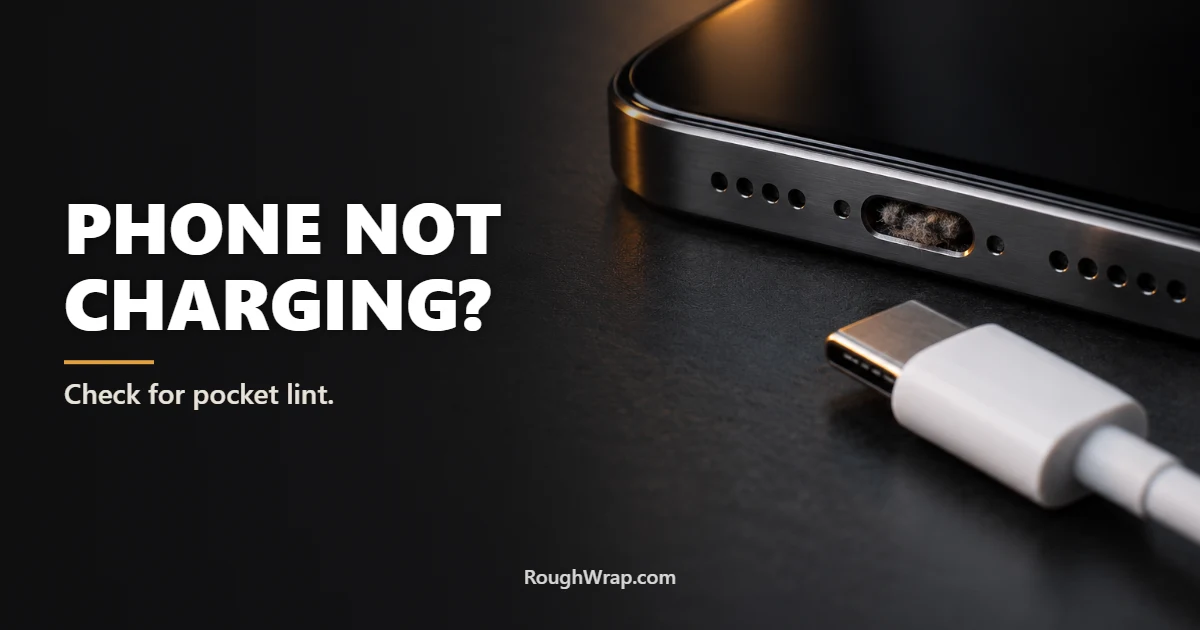
Hold on. Before you pay anyone, grab a flashlight and look into the charging port. There’s a very good chance it’s packed with pocket lint. Every time you slide your phone into a pocket, a little lint gets in, and every time you plug in the cable, it gets pressed down tighter. After a year, there’s a felt pad at the bottom of the port keeping the plug from seating.
Signs your port is full of lint
The cable feels loose or won’t click in fully. Charging cuts in and out when you move the phone. It only charges at a certain angle. Your car’s CarPlay or Android Auto keeps disconnecting. If any of those sound familiar, check the port before anything else.
Step 1: Turn the phone off
Power it all the way down. You’re about to poke around near electrical contacts, and you don’t want anything shorting out. Unplug any cables too.
Step 2: Look with a flashlight
Use a flashlight (another phone works fine) and look straight into the port. You’ll probably see gray or blue fuzz packed at the bottom. Sometimes it’s sand, crumbs, or pocket grit. Knowing what’s in there helps you be gentle about getting it out.
Step 3: Gently scrape it out with something non-metal
A wooden toothpick is the classic tool, and it works. Slide it in along the edge of the port, flat against the side wall, and gently scrape toward the opening, pulling the lint out in clumps. Don’t pry against the center tab or the contacts, and don’t jam it straight down hard. Take your time. You’ll be surprised how much comes out.
A charging port cleaning kit makes this easier. These come with soft plastic picks and tiny brushes sized for USB-C and Lightning ports, and they’re cheap.
What not to use
No metal. Paper clips, SIM ejector tools, safety pins, and needles can scratch or short the contacts. Stick to wood or plastic.
No liquids. Don’t spray cleaner, rubbing alcohol, or water into the port. Liquid and charging contacts don’t mix.
Go easy with air. Blowing into the port adds moisture from your breath. A can of compressed air can loosen loose dust, but short, gentle bursts only, held at a distance. Blasting it can drive lint deeper.
Step 4: Test the charge
Turn the phone back on and plug in your cable. It should click in firmly and charge without wiggling. If it still won’t charge after a thorough cleaning, try a different cable and charger, since the cable might be the real problem (frayed cables are a common cause; here’s why cables fray and how to stop it). If nothing works, the port itself may be damaged, and that’s when it’s time for a repair shop.
Keep it from happening again
A pack of silicone dust plugs costs a few dollars and keeps lint out of the port when you’re not charging. They’re especially worth it if you work outdoors, carry your phone in a jeans pocket all day, or spend time at the beach. Switching to wireless or MagSafe charging most of the time helps too, since you’ll plug a cable in less often.
And a case with a covered port flap (common on rugged cases) blocks most pocket debris. Our rugged phone case guide notes which models have port covers.
FAQ
How do I know if my charging port is full of lint?
Signs include a cable that won’t click in fully, charging that cuts in and out, or a phone that only charges at a certain angle. Shine a flashlight into the port, and you’ll often see packed gray fuzz at the bottom.
What is the safest way to clean a phone charging port?
Turn the phone off, then gently scrape the lint out with a wooden toothpick or a plastic port cleaning tool, working along the side walls. Avoid metal objects and liquids.
Can I use compressed air to clean my charging port?
Short, gentle bursts from a distance can loosen light dust, but strong blasts can push lint deeper. A wooden or plastic pick usually works better for packed lint.
Can I use a SIM tool or paper clip?
It’s not a good idea. Metal tools can scratch or short the charging contacts. Use wood or plastic instead.
Why does my phone only charge at an angle?
Usually because lint packed at the bottom of the port keeps the plug from seating fully. It can also mean a damaged cable or a worn port.
How do I keep lint out of my charging port?
Use silicone dust plugs, charge wirelessly when you can, or use a case with a port cover. Cleaning the port every few months also helps.
Disclosure: Rough Wrap may earn a commission if you buy through links on this page, at no extra cost to you. See our affiliate disclosure.

One Comment